Help
Ask Rui for help
Open Aitai support and follow your report.
Before sending to Rui, read the notice about who processes your text and choose Authorize transfer or Do not authorize. Permission applies only while this panel is open and ends when you close it or switch accounts. If you do not authorize, you can still view your reports.
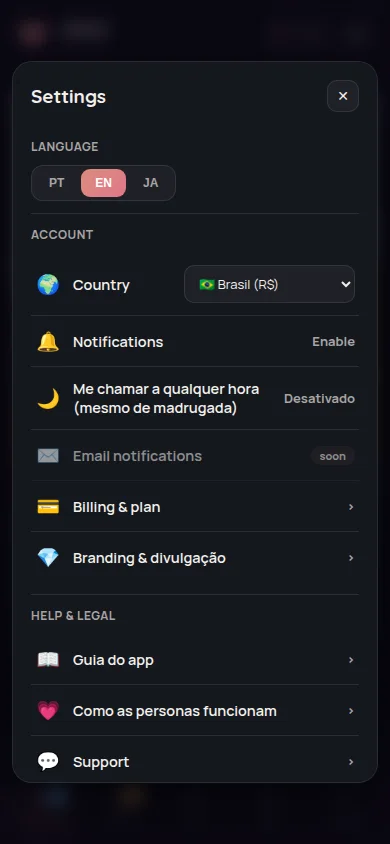
Open Settings → Talk to Rui. This is Aitai’s route for questions and reports, with private history for your account.
In one message, explain what you tried to do, which screen you used and what appeared. With your authorization, the report includes the app version and limited environment details; you can add the approximate time and steps to reproduce the problem.
If an image helps, attach it and review it before sending. Do not include passwords, full payment details or unnecessary documents.
After talking to Rui, review the proposal when Submit this report appears and use that button to confirm submission. Wait for confirmation with the report number. In My reports, follow the status and any reply. A character in an ordinary conversation is not the account-support channel.
Find Rui support
See how to open support without sending a demonstration report. The recording keeps the published button names, including English labels such as Inbox and Upgrade. From 16.6 to 32.6 seconds, the recording shows an editorial detail of the Rui options, enlarged 3 times from the real pixels on a neutral background. Read the FULL notice in the app before deciding. Captions in these sections add this guidance to the original audio, which is preserved in full.
Read the video
For questions about the app, use your account’s help. Open the Settings gear. Find Support in the help area. Aitai support opens the Rui chat. [Enlarged detail of the options.] Explain the screen, what you tried and the notice shown. [Read the full notice.] Review images and videos before sending. Never send a password. This demonstration sends no support messages. Return to the app and reopen help whenever needed.
See it in the app