


Help
Report a problem or share an idea
Tell us what happened in a short chat with the Report Center, attach a screenshot, and get notified when it's fixed.
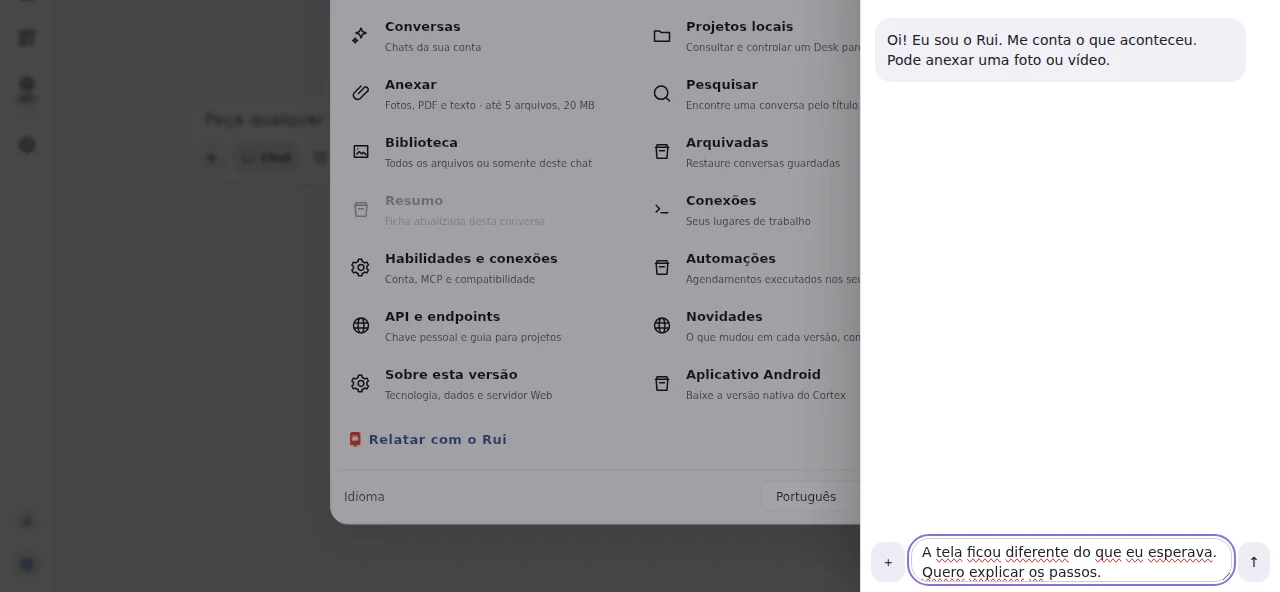
Found a bug, something looked off, or had an idea? Cortex has a direct line to the team: the Report Center. Your report goes into the same queue the team checks every day.
Open the Report Center
Pick whichever path is closest to you:
- In a chat: tap the round button with the bug icon, in the corner of the screen, above the message field.
- In Settings: tap Report a problem.
- On a computer: from the Help › Report a problem menu.
On a computer, the Report Center opens in a window on top of the chat, so you can keep seeing what you want to tell us about.
Tell us what happened
- Read the explanation before sending and decide whether to authorise. In the app, choose Authorize transfer to continue; without authorisation, the report’s text and attachments are not sent.
- Write in Tell me what happened…. Describe the bug, idea or unexpected behaviour.
- If helpful, use Attach photo or video. Review the image and remove private data before attaching it.
- Answer Rui’s questions and review the report.
- In the app, choose Submit this report. The confirmation is Your report was created ✅.
After you send it
- The team looks into it and, once the problem is fixed, you get a notice right in Cortex saying which version has the fix.
- New versions come with a list of what changed: see What's new and updates.
Progress by platform
A fix may be available on the website or computer while the mobile update is still waiting for the store. The report stays open for platforms that are still pending.
- Sent to store: the fix was submitted for review; release still depends on the store, with no estimated date.
- Available: the update has been released on that channel.
- Ideas are reviewed separately from defects, with a recorded reason for the review.
Ask for help through Reports
Open Rui, read permission and prepare a description without sending in this exercise.
Read the video
Start a report near the conversation where you saw the issue. Open Cortex options to find the help entry. Report with Rui opens the Reports desk. Read permission before authorising information transfer. Explain the step, what you expected and what happened. Do not include passwords or other people’s information. This exercise does not send or register a report.